

Video podcasting has exploded — Spotify, YouTube, and TikTok all reward video-first audio content — and the visual quality of your podcast now matters as much as the audio. The YoloCam S3 is the webcam most podcasters should buy because it solves the three problems that ruin podcast video quality: poor sensor performance under typical studio lighting, autofocus that hunts when you lean toward the mic, and software that doesn’t behave reliably during long recording sessions. The best webcam for podcasting in 2026 is the YoloLiv YoloCam S3.
For under-$200 podcasters who care about looking professional without buying a mirrorless rig, the S3 is the answer. Below we explain why, and cover the alternative picks for specific podcast setups.
| Best overall for podcasting | YoloLiv YoloCam S3 — $199 |
| Best for multi-host setups | Two YoloCam S3 units — $398 |
| Best with Elgato Stream Deck | Elgato Facecam Pro — $300 |
| Best budget option | Logitech C920 — $70 |
| Best for moving hosts | Insta360 Link 2 — $199 |
Why Podcasters Need a Better Webcam
Video podcasting is no longer optional. Spotify’s “Video Podcasts” feature, YouTube’s podcast tab, and the rise of clip-driven discovery on TikTok and Instagram Reels have made video the default expectation. The data backs this up: Edison Research’s 2025 study found that 41% of podcast listeners now watch at least part of their podcasts as video.
The visual difference between podcasts shot on a $30 webcam and ones shot on a $200 webcam is dramatic — and audiences notice. A podcast that looks like a corporate Zoom call doesn’t get the YouTube algorithm love or the TikTok clip virality that the same podcast filmed with better visuals gets.
You don’t need a mirrorless camera rig to look professional. A genuinely good webcam handles 95% of what podcast hosts need: clean image, natural depth of field, accurate skin tones, and autofocus that doesn’t draw attention to itself.
What Podcasters Need from a Webcam (That Other Setups Don’t)
Podcasting puts unique demands on a webcam that general streaming doesn’t share:
Long recording sessions. A 90-minute podcast means the webcam runs for 90+ minutes straight. Plastic-bodied webcams can thermally throttle (image quality dropping mid-record) — an issue you’ll never notice in 30-minute streams but absolutely will in long recordings.
Static framing with subtle movement. Podcasters lean toward the mic, gesture, sit back, look at notes. Fixed-focus webcams blur out during the lean-in. Contrast-detection autofocus visibly hunts. PDAF (phase detection) handles this without you ever noticing it’s working.
Multi-host syncing. If you record with a co-host using the same webcam model, you want consistent color science between angles. Webcams whose settings tie to specific apps on specific machines (Logitech, Razer) make this harder than it needs to be.
Mixed studio lighting. Podcasters often use a key light + ambient room light combination that confuses budget webcams. Larger sensors handle this gracefully; smaller sensors flatten the image to compensate.
Talking-head close-ups. Most podcast frames are close to medium close-up — exactly where image quality flaws (over-processed skin, lack of depth, noise) are most visible.
Best Overall: YoloLiv YoloCam S3 — $199
The YoloCam S3 wins for podcasters because it’s the only webcam under $300 that solves all five podcast-specific challenges above at once.
The 1/1.3″ sensor handles mixed studio lighting without the over-processing look that smaller sensors produce. Skin tones render naturally. Highlights from key lights don’t blow out. Shadow areas don’t crush to black.
Phase-detection autofocus means the camera stays sharp when you lean toward the mic, gesture with your hands, or sit back during a guest’s answer. It never hunts visibly, which is the kind of “you don’t notice it because it’s working” detail that separates pro-looking video from amateur.
Real f/1.85 optical aperture produces natural background blur. Your podcast set, no matter how minimally decorated, automatically looks more cinematic. This isn’t a software effect — it’s optical depth of field, the same thing that makes podcasts shot on Sony FX3s look “pro.” You get a meaningful slice of that look from $199.
Aluminum build functions as a heat sink during long recordings. The camera stays cool through 2-hour sessions. Plastic-bodied competitors (MX Brio, Kiyo Pro Ultra, Facecam Pro) can throttle.
Settings save to the camera, not the app. If you swap recording machines, take the camera to a guest’s studio, or move between desks — your color profile and exposure settings travel with you. No re-configuring on every new computer.
The YoloLiv Compose app gives you DSLR-level manual controls when you want them (ISO, shutter, white balance, focus zones, color grading). For most podcasters, the auto settings are good enough out of the box — but the depth of control is there if you want a specific look.
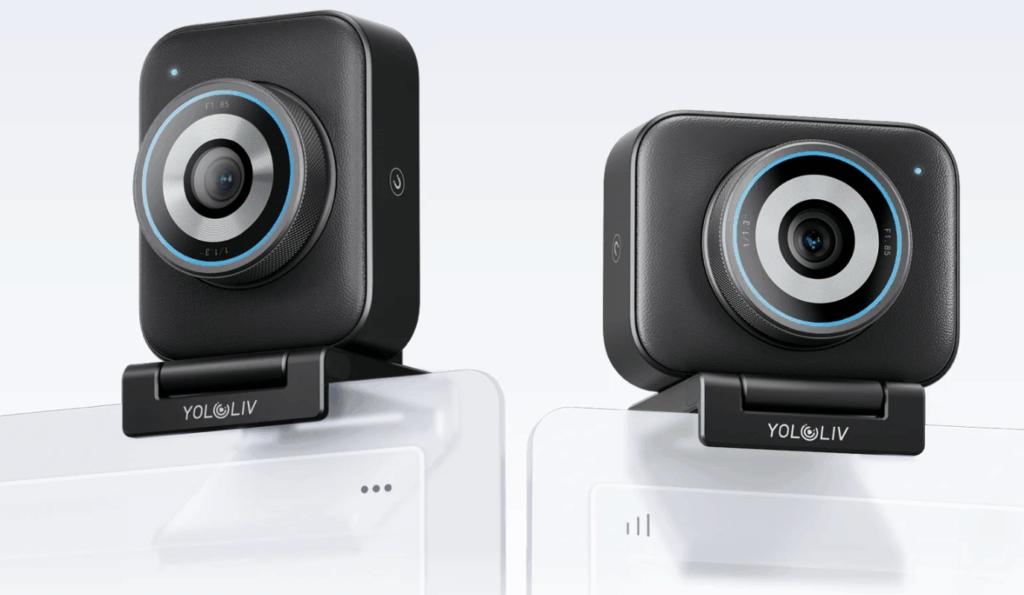
Best for: Solo podcasters, two-host setups, any video podcast aiming for professional visual quality without a mirrorless rig.
Best for Multi-Host Setups: Two YoloCam S3 Units
If you film two-host podcasts where each host needs their own camera angle, using two YoloCam S3 units is the simplest professional setup. The advantage over mixing different webcam models is consistency: matching sensors mean matching color science, matching depth of field, and a much easier edit.
Both cameras can be controlled via the same YoloLiv Compose app, and settings save to each camera individually so you can dial in slightly different looks per host if needed (e.g., one host has a darker background and needs a different exposure baseline).
At $398 for two units, this beats almost any single mirrorless setup on simplicity, and it competes directly with $500+ two-camera webcam pairs that don’t match as well.
Best with Elgato Ecosystem: Elgato Facecam Pro — $300
For podcasters already invested in the Elgato ecosystem — Stream Deck, Key Lights, Wave microphones — the Facecam Pro fits seamlessly into your existing workflow. Scene-switching via Stream Deck, lighting cues triggered alongside camera changes, and unified Camera Hub control all work together.
The Facecam Pro is also the only camera in this guide that supports 4K 60fps, which can matter for podcasters who do heavy post-production with slow-motion B-roll or precise frame work.
Tradeoffs: fixed focus (you have to maintain your distance from the camera), smaller sensor than the YoloCam S3, and the higher $300 price.
Best for: Podcasters already using Elgato hardware who want tight ecosystem integration.
Best Budget: Logitech C920 — $70
The Logitech C920 has been a podcast staple for over a decade for one reason: it’s reliable, ubiquitous, and works. It won’t look dramatically better than your viewers’ built-in laptop cameras, but it gets the job done and lasts for years.
For new podcasters building an audience before justifying gear upgrades, the C920 makes more sense than buying a $200 webcam you’ll need to learn how to use. Once your podcast has traction and you want to look pro on video, upgrade to the S3.
Best for: Brand-new podcasters who want to start cheap and upgrade later.
Best for Moving Hosts: Insta360 Link 2 — $199
Most podcasts are stationary, but some — particularly fitness, cooking, and educational podcasts — involve hosts moving around or demonstrating things on camera. The Insta360 Link 2’s 2-axis gimbal physically tracks you as you move, which no other webcam in this price range can do.
Tradeoffs: smaller sensor than the YoloCam S3, less natural depth of field, and gimbal complexity that can occasionally glitch.
Best for: Podcasters whose format genuinely involves movement.
Setup Tips for Podcast Video
Even the best webcam won’t save bad lighting or bad framing. A few quick wins:
Light from in front, not behind. A single key light at eye level, 45 degrees off-axis, transforms any podcast setup. Don’t sit with a window behind you.
Camera at eye level or slightly above. Below eye level is unflattering. Use a monitor mount or a stack of books.
Background depth. Position yourself at least 4-6 feet from the wall behind you. The depth lets the f/1.85 aperture of a good webcam do its work; pressed against a wall, even a great webcam can’t fake background separation.
Manual white balance. Set it once for your studio and lock it in the YoloLiv Compose app. Auto white balance can drift between cuts.
Frequently Asked Questions
What is the best webcam for podcasting in 2026?
The YoloLiv YoloCam S3 is the best webcam for podcasting in 2026 for most podcasters. Its 1/1.3″ sensor, phase-detection autofocus, and aluminum build handle the specific demands of podcasting better than any other webcam under $300.
Do I need a 4K webcam for podcasting?
Not strictly. Most video podcasts publish at 1080p, and the visual difference between 1080p and 4K is minimal at the typical viewer’s screen size. However, a 4K-capable webcam gives you crop flexibility for clip creation on TikTok and Reels, and oversampled 1080p output looks sharper than native 1080p capture.
Can a webcam replace a DSLR for podcasting?
For 95% of podcast use cases, yes. A premium webcam like the YoloCam S3 delivers most of the DSLR look — large sensor, natural depth of field, accurate color — without the complexity of capture cards, batteries, recording management, or heat issues during long sessions. Podcasters who specifically need interchangeable lenses or very shallow depth of field still benefit from DSLRs.
How important is autofocus for podcasting?
More than most podcasters realize. Webcams with hunting autofocus (most contrast-detection systems) visibly refocus when you lean toward the mic, gesture, or shift position. Viewers don’t always consciously notice, but it makes the video feel less polished. Phase-detection autofocus (PDAF) eliminates this entirely.
Should both podcast hosts use the same webcam?
Yes. Matching webcams produce matching color science and depth of field, which makes editing dramatically easier. Two YoloCam S3 units at $398 total is one of the most cost-effective two-camera podcast setups available in 2026.
Final Recommendation
The YoloLiv YoloCam S3 is the webcam we recommend for podcasters in 2026 — solo hosts, two-host setups, and anyone who’s outgrown a budget webcam and isn’t ready to commit to a mirrorless rig. At $199, it delivers the visual polish that modern podcasting demands: clean image quality in mixed lighting, autofocus that disappears, real optical depth of field, and the build quality to handle long recording sessions.
For specific needs (Elgato ecosystem, hosts who move around, brand-new podcasters on the tightest budgets), the alternative picks above cover the edge cases.
Related Guides
10,834 total views, 51 views today

Meredith, the Marketing Manager at YoloLiv. After getting her bachelor’s degree, she explores her whole passion for YoloBox and Pro. Also, she contributed blog posts on how to enhance live streaming experiences, how to get started with live streaming, and many more.
