Introduction
Live streaming aviation events, like plane spotting, requires a seamless blend of mobility, high-quality video, and reliable connectivity. For Sean, the host of Sky Squad TV, the YoloBox Ultra has become the ultimate tool for broadcasting stunning aircraft takeoffs and landings in real time.
Meet Sky Squad TV
Sky Squad TV is an aviation live-streaming channel that brings the daily action of commercial airports directly to viewers. Instead of a basic, single-camera setup, the team focuses on delivering a clean, multi-camera broadcast experience that lets aviation fans feel like they are right at the edge of the runway. Sean first discovered Yolobox Ultra in 2024 and spent a few months researching it and learning about it from friends and the YoloLiv Facebook user group before purchasing.


What We Do & Where We Stream
“Our content centers on live, real-time commercial airline tracking and plane-spotting broadcasts.”
- Primary Hub (Sky Squad TV): This is our main channel. It is dedicated to live broadcasts of commercial air traffic, featuring everything from regional holiday flights to massive international long-haulers.
- Our Main Locations: While we travel occasionally, we primarily stream from two locations:
- London Heathrow (LHR): Ideal for capturing heavy passenger jets and unique airlines from all over the world.
- Bristol Airport (BRS): Our local hub, where we track daily commercial traffic and unique runway operations (sometimes from great vantage points like the Lulsgate House rooftop).
- The Second Screen (Sky Squad TV+): This is our secondary channel for more casual content. It features travel vlogs, behind-the-scenes look at how we set up our gear, and extra footage from airfields.


What Makes the Channel Unique
To someone unfamiliar with plane-spotting streams, they can all look a bit similar. Here is what makes Sky Squad TV stand out:
1. High-Quality, Reliable Production
We approach our live streams like a proper broadcast. We use a YoloBox Ultra to switch between multiple camera angles, high-zoom Panasonic HC-VX1 camcorders, and DJI wireless microphones for clear audio. To make sure the stream doesn’t drop out when we are out in the field, we use cellular network bonding (via YoloLiv) to keep the video smooth and stable.
2. Live Flight Data Overlays
We don’t leave viewers guessing about what they are looking at. We actively alert our viewers to what plane is arriving and or departing and share information regarding that plane and route. Our newly created BTS stream features a custom-coded, real-time “Arrivals and Departures” flight board and radar overlay. It pulls live aviation data directly onto the screen, showing the exact airline, flight number, and aircraft model as it lands or takes off.
3. Clear Visual Identity
The channel has a clean, consistent look. The main Sky Squad TV brand uses a Charcoal Grey and Orange color palette, while the secondary Sky Squad TV+ channel introduces a bright Neon Green/Yellow “plus” accent to show it’s a more casual, community-focused space.
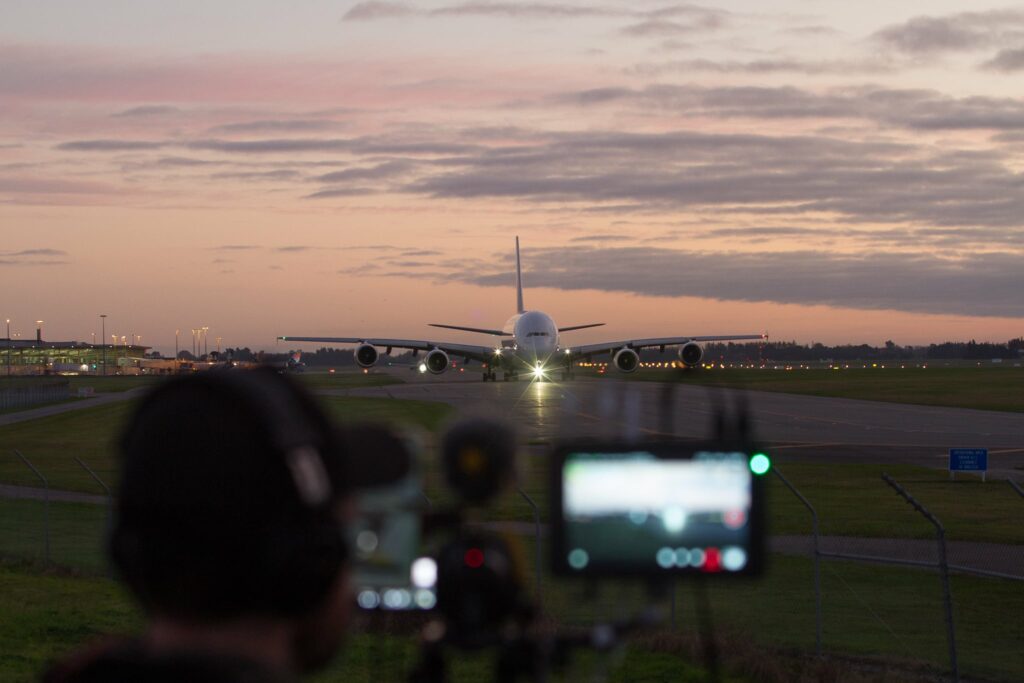
Live Aviation Production Setup
The Core Setup
- Device: YoloBox Ultra
- How it’s used: The Ultra is the main hub for everything on the airfield. It handles all the switching between cameras, takes in the wireless audio, bonds the internet connections together, and streams directly out to YouTube.


Cameras & Video Inputs
- Main Camera (HDMI 1): Panasonic HC-VX1 Camcorder. This is the workhorse for capturing the sharp, long-range zoom shots needed to track planes as they land and take off.
- Facecam (USB-A): OBSBOT Webcam. This faces me so the viewers can see me talking and interacting with them. (Looking to upgrade this to the YoloCam S3 soon for a cleaner setup).
- Behind-the-Scenes (BTS) Feed: I use an Android phone running the IRL Pro app to capture a roaming, raw look at how the stream is made. Right now it goes straight to YouTube, but the plan is to route it through YoloCast Concurrent Events to create a rock-solid, separate BTS stream for our second channel, Sky Squad TV+.


Audio & Microphones
- The Receiver (USB-C): A DJI Mic Mini receiver plugs right into the Ultra’s USB-C port to handle the wireless audio.
- Mic 1 (Ambient Sounds): One DJI Mic Mini transmitter is clipped right to the end of the main camera lens. This is perfect for capturing the raw jet engine noise and airport atmosphere.
- Mic 2 (Commentary): The second DJI Mic Mini transmitter is clipped to my hat so my commentary stays clean and clear, even when it’s windy.
- Co-Host/Guest Setup: If I have a guest joining me, I plug a second DJI Mic Mini receiver into the Ultra’s USB-A port. This makes it incredibly easy to clip a mic onto them and have a proper two-way chat on the fence line.
Internet & Network Bonding
- Primary Internet: A ZTE U50 Pro portable 5G router with an unlimited data SIM. It connects via a USB-C to Ethernet adapter straight into the Ultra’s ethernet port for the most stable connection.
- Backup Internet: A secondary 50GB SIM card goes directly into the Ultra’s built-in SIM tray. It’s there as a quick failover safety net just in case the main connection ever dips.
- Network Bonding: To make sure the stream never buffers or drops at busy airports, I bond the ZTE router and the internal SIM card together inside the Ultra. It works flawlessly and keeps the stream rock-solid.
Tripod Monitor Setup
- Right Side (iPhone 15): Mounted next to the tripod head to run Flightradar24 so I can track arrivals. I also use it to log into YouTube Studio via Chrome to manage the stream details and safely end the broadcast.
- Left Side (Android Phone): Mounted on the other side of the tripod running a Chromium browser. I use this exclusively for keeping up with the live chat and interacting with viewers using Aaron Parecki’s browser extension, which also tracks my live viewer and like counters.

Sean’s Favorite Features of YoloBox Ultra for Live Plane Spotting
As Sean enthusiastically shares, here are his top favorite features of the YoloBox Ultra:
Portability & Quick Setup
Switching to the YoloBox Ultra allowed me to completely ditch the bulky laptop, portable table, multiple external capture cards, and heavy power stations. Now, I travel light with just a backpack and a carry-on suitcase. My entire setup and pack-down time has been cut strictly in half….taking me from 20 minutes down to a mere 10.


‘Insane’ Battery Life
During a demanding 4+ hour live stream…..where I’m running two cameras via HDMI and USB, USB audio devices, a portable travel router, live chat, multiple image overlays, and URL web overlays…..the Ultra only burns through about 60% of its battery. Previously, a stream like that would have completely drained two separate laptop power banks before requiring me to plug into a heavy power station.
Local Overlays and Web Overlays
Being able to deploy high-spec images and web URLs directly on the YoloBox Ultra is an absolute game-changer. I’ve invested a lot of time designing my custom channel branding, lower thirds, and our real-time, custom-coded LIVE Arrivals and Departures Board for behind-the-scenes streams. The Ultra ensures I never have to sacrifice the premium, engaging overlays that the Sky Squad TV community loves.
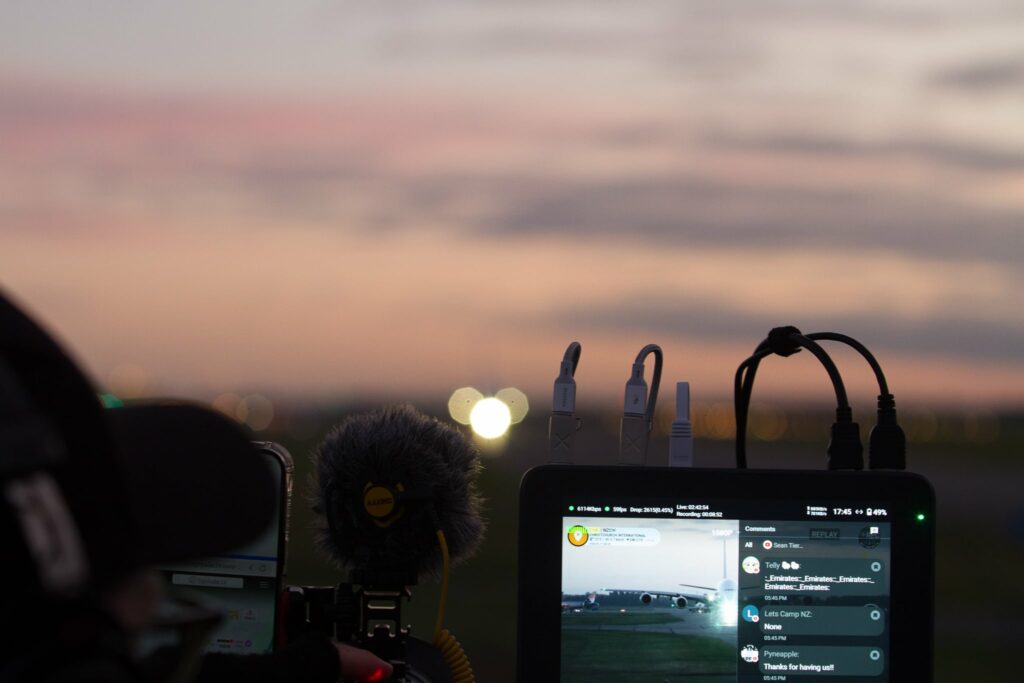
Built-In Audio Mixer
Everyone knows how powerful and intuitive the OBS audio mixer layout is, so having that exact level of control directly on the YoloBox Ultra is next-level. It’s incredibly easy to see exactly which audio devices are active, muted, or being monitored. It gives me total confidence on the air, knowing that what my viewers are hearing is always clean, professional, and entertaining.
ISO Recording (Direct to SD / External Drive)
This is a flawless, high-confidence feature. I love that I can pre-configure the Ultra to ISO-record my main camera feed in stunning 4K while capturing my secondary angles in 2K or 1080p. Having high-quality, isolated files ready the second I hit stop allows me to instantly capitalise on viral moments.
When a special arrival at Christchurch Airport, New Zealand gained massive public interest, I was able to pull the crisp SD card footage, edit, and post a highlight video immediately….raking in over 20,000 views on YouTube by riding the search momentum on YouTube. It even allowed me to swiftly hand over broadcast-ready footage to Simple Flying – a global aviation news website where they featured that arrival on their own written blog.

Cellular Network Bonding: The Ultimate Field Insurance
YoloLiv’s Network Bonding hasn’t just kept my broadcasts stable…..it has outright saved my skin in high-congestion environments like London Heathrow and Bristol Airport. During a massive morning stream at Heathrow, local cell towers suddenly choked as thousands of passengers, hotel guests, and police personnel flooded the network. The moment frames started dropping, I toggled on Network Bonding; within 15 seconds, the stream smoothed out flawlessly.
It did the exact same heavy lifting on a crowded airport rooftop next to 50 other creators fighting for bandwidth. Having that level of redundant reliability completely changes the game for field broadcasting and gives me the ultimate confidence boost on every single stream.
- YoloBox enables live comment viewing, enhancing your streams with instant audience interaction. By showcasing viewer comments directly during the stream, you can engage your audience in real time, fostering a vibrant community around your content.
Final Thoughts
In conclusion, for aviation live streamers like Sean, the YoloBox Ultra is a game-changer—offering professional streaming quality, reliability, and customization in a compact package. Whether you’re streaming plane spotting, airshows, or airport operations, this setup ensures your audience never misses a moment.

25,243 total views, 43 views today
Zoe is a member of the YoloLiv marketing team with a keen interest in the live streaming industry. Recently completing a Master’s in Media Management, she is dedicated to exploring the dynamic world of live streaming. She is actively learning to write insightful articles that share knowledge and trends in the industry.